
Personal Knowledge Management (PKM) systems like Obsidian and Notion are designed to serve as an external brain. You build connected networks of ideas, capture fleeting thoughts, organize literature notes, and build project wikis using Markdown and structured databases.
Yet the primary input device for these systems remains a mechanical keyboard designed in 1874.
When you have a sudden insight while reading a paper or planning a product strategy, the physical friction of typing at 40 to 60 words per minute forces your working memory to slow down. By the time your fingers format headings, bold tags, and bullet points, the original clarity of the thought has dissipated.
Voice dictation solves this bottleneck by capturing thoughts at conversational velocity (150 to 220 words per minute).
However, using cloud-based voice dictation tools introduces a critical paradox for knowledge workers: Obsidian users choose local Markdown files specifically to own their data offline, yet cloud dictation apps upload every spoken word to remote servers.
Here is how modern on-device voice dictation with NeverType pairs with Obsidian and Notion to capture ideas four times faster without leaking your private thoughts to the cloud.
1. The Cognitive Bandwidth Gap in Knowledge Work
Typing creates a mechanical bottleneck between human mental conceptualization, which operates at over 200 words per minute, and physical text input, which caps out between 40 and 60 words per minute for most professionals.
When you write notes manually:
- You edit while typing, which interrupts your train of thought.
- You stop to fix typos, backspacing through half-finished thoughts.
- Physical hand fatigue causes you to abbreviate complex insights into shallow bullet points.
Speaking your notes aloud bypasses the physical filter. When you articulate an argument verbally, your brain accesses narrative flow. You explain the context, the nuance, and the counterarguments naturally.
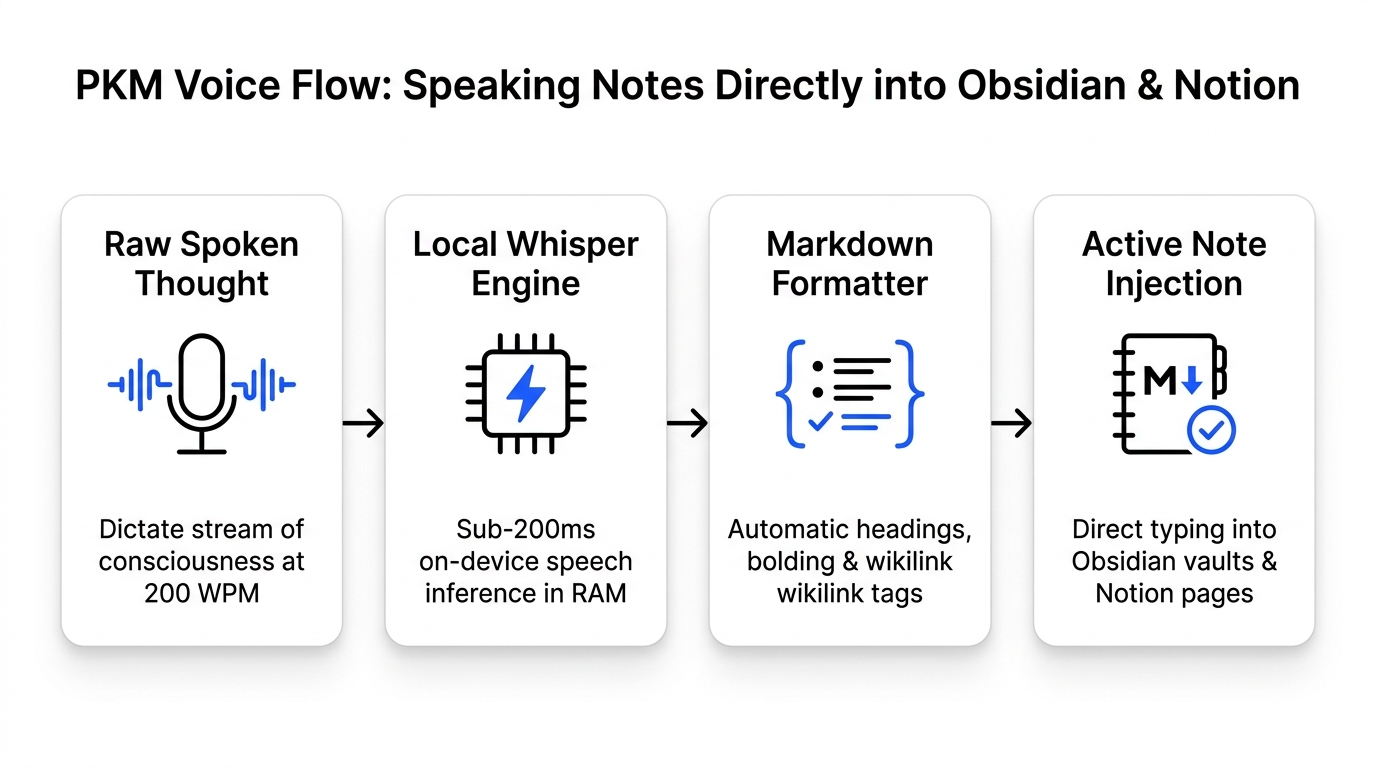
NeverType operates as a high-speed audio bridge. You hold a global hotkey, speak continuously for two minutes, and release. NeverType processes your speech locally using optimized Whisper and Moonshine neural weights, strips conversational pauses and filler words, formats the syntax, and injects clean text directly into your cursor.
2. Obsidian + NeverType: The Sovereign Local Stack
NeverType and Obsidian form a completely sovereign, offline knowledge environment because both applications store and process data strictly on your physical machine with zero cloud dependencies.
The Sovereign Local Knowledge Stack:
[Spoken Insight]
      │ (CoreAudio / WASAPI ring buffer)
      ▼
[NeverType Local RAM Inference] ──> Zero Cloud Packets (100% Offline)
      │ (OS accessibility injection)
      ▼
[Obsidian Local Markdown Vault] ──> Stored on Local Disk (.md files)
Obsidian power users choose Obsidian over cloud note tools because of the "local-first" philosophy:
- Your notes live as plain
.mdtext files on your local hard drive. - If Obsidian closes down tomorrow, your files remain readable.
- Proprietary research, private journals, and unpublished books remain completely private.
Using cloud speech apps like Wispr Flow or cloud transcription services completely violates this local-first model. Streaming your microphone audio over public internet connections sends your most intimate brainstorms, proprietary research, and private journal entries to remote servers.
NeverType preserves the sovereign architecture. All audio buffers exist strictly in volatile RAM and are destroyed immediately upon transcription. You can disconnect your Wi-Fi entirely and dictate multi-page research documents inside Obsidian with sub-200ms latency.
3. Formatting Markdown and Wikilinks with Your Voice
NeverType formats Markdown syntax, lists, and wikilinks contextually, allowing you to build connected Zettelkasten cards without touching the keyboard.
When dictating into Obsidian, you can format structural Markdown elements through natural vocal commands:
Creating Obsidian Wikilinks
To create a link to another note in your vault, speak the link target directly:
- Spoken: "This concept connects directly to bracket bracket spaced repetition bracket bracket and bracket bracket active recall bracket bracket."
- Transcribed Output:
This concept connects directly to [[spaced repetition]] and [[active recall]].
Generating Structural Markdown Hierarchies
NeverType understands semantic list items and hierarchical structuring:
- Spoken: "The three core principles of cognitive load theory are colon new line dash intrinsic cognitive load new line dash extraneous load new line dash germane processing."
- Transcribed Output:
The three core principles of cognitive load theory are:
- Intrinsic cognitive load
- Extraneous load
- Germane processing
Adding Code Blocks and Inline Syntax
For technical researchers keeping code snippets in Obsidian, NeverType handles technical terminology and programming symbols:
- Spoken: "To parse the local directory in Python we use import os and then for file in os dot listdir open paren path close paren."
- Transcribed Output:
To parse the local directory in Python we use import os and then for file in os.listdir(path).
4. Notion Workflows: Rapid Meeting Summaries and Database Specs
Knowledge workers use NeverType inside Notion to convert rambling voice brain-dumps into structured product requirements, meeting agendas, and team updates in seconds.
Turning Verbal Brain-Dumps into Project Specs
When planning a new project in Notion, typing a detailed specification can take forty-five minutes. With NeverType, open a blank Notion page, hold your push-to-talk key, and describe the feature end-to-end:
"We need to redesign the user onboarding flow for our team workspace. Currently, new invited members land on an empty dashboard with no orientation. In the new flow, we will display an interactive modal with three steps: first, verify team role; second, import existing markdown documents; third, invite two teammates. Target release is Q4."
NeverType cleans up conversational disfluencies and formats the transcript into readable paragraphs. You can then use Notion's AI blocks to organize the text into a toggle list or database table.
Dictating Daily Standups and Asynchronous Updates
Instead of typing lengthy Slack messages or Notion daily check-ins, team leads use NeverType to dictate 300-word daily retrospectives in under ninety seconds.
5. Comparative Evaluation: Note-Taking Speed & Privacy
The following table benchmarks manual keyboard note-taking against cloud speech tools and NeverType:
| Note-Taking Metric | Traditional Keyboard | Cloud Speech (Wispr Flow) | NeverType Local Flow |
|---|---|---|---|
| Input Speed | 40 – 60 Words / Minute | 150 – 200 Words / Minute | 180 – 220+ Words / Minute |
| Data Privacy | 100% Local (Obsidian) | 0% (Audio sent to cloud) | 100% Local (Zero network packets) |
| Input Latency | Instant (physical keys) | 450ms – 1,200ms lag | Sub-200ms (tactile response) |
| Offline Reliability | Works offline | Fails without internet | 100% Works offline |
| Physical Hand Strain | High (tens of thousands of taps) | Zero wrist strain | Zero wrist strain & RSI relief |
| Markdown Syntax Support | Manual typing required | Inconsistent formatting | Native Markdown & Wikilink support |
| Subscription Cost | Free | $12 – $15 / Month | Free Trial + Lifetime ownership |
6. How to Set Up Your Voice-First PKM Workspace
You can configure NeverType for Obsidian and Notion in less than three minutes:
- Download and Launch NeverType: Install the native build for macOS (optimized for Apple Silicon Metal), Windows (DirectML), or Linux.
- Assign a Global Push-to-Talk Hotkey: We recommend assigning
Right Option(macOS) orRight Alt(Windows/Linux). This allows you to trigger dictation with your thumb while keeping your hands naturally rested. - Open Obsidian or Notion: Place your cursor inside any document, daily note, or database block.
- Hold and Speak: Hold your hotkey, dictate your thought at normal conversational speed, and release. Your formatted prose appears at your cursor instantly.
7. Frequently Asked Questions
Can NeverType insert Obsidian wikilinks and tags automatically?
Yes. NeverType captures your spoken words with high precision as natural plain text without intrusive formatting changes.
Does NeverType store my notes or voice recordings?
No. NeverType does not have a cloud database and never stores your voice recordings or written transcripts. All speech models run directly on your local CPU and GPU. Audio data exists strictly in volatile RAM while you speak and is purged immediately upon text injection.
Can I dictate notes while working offline on an airplane or train?
Yes. Because NeverType executes 100% of speech inference on-device using local Whisper and Moonshine neural weights, you can use NeverType in full airplane mode without an active Wi-Fi or cellular connection.
How does NeverType handle technical terms or acronyms in research notes?
NeverType's neural weights are trained on comprehensive datasets including academic papers, open-source repositories, and technical literature. It accurately transcribes terms like "Zettelkasten", "spaced repetition", "epistemology", and programming syntax without manual phonetic training.