
Two years ago, I gave up on speech dictation after forty-eight hours of pure frustration. I had set up a USB microphone on my desk, opened my email client, and tried dictating a reply to a client about a delayed software release.
My thoughts came out in messy bursts. I paused, doubled back on a date, mumbled three filler sounds, and restarted a clause halfway through.
When I looked down at the screen, Apple Dictation had dumped every acoustic mistake into the text field. It pasted a run-on block with no commas, zero capitalization on our product name, and four instances of "um" sitting between broken phrases.
I spent four minutes highlighting text with my trackpad, backspacing repeated syllables, and re-typing clauses by hand. Dictating that email took twice as long as typing it on my mechanical keyboard.
Raw acoustic transcription only captures the sounds coming out of your mouth. Raw transcription is almost never what you want to send to a colleague.
Wispr Flow addressed this problem in 2024 by pairing speech recognition with a grammar-polishing model. Your spoken words drop onto your screen as coherent, formatted sentences.
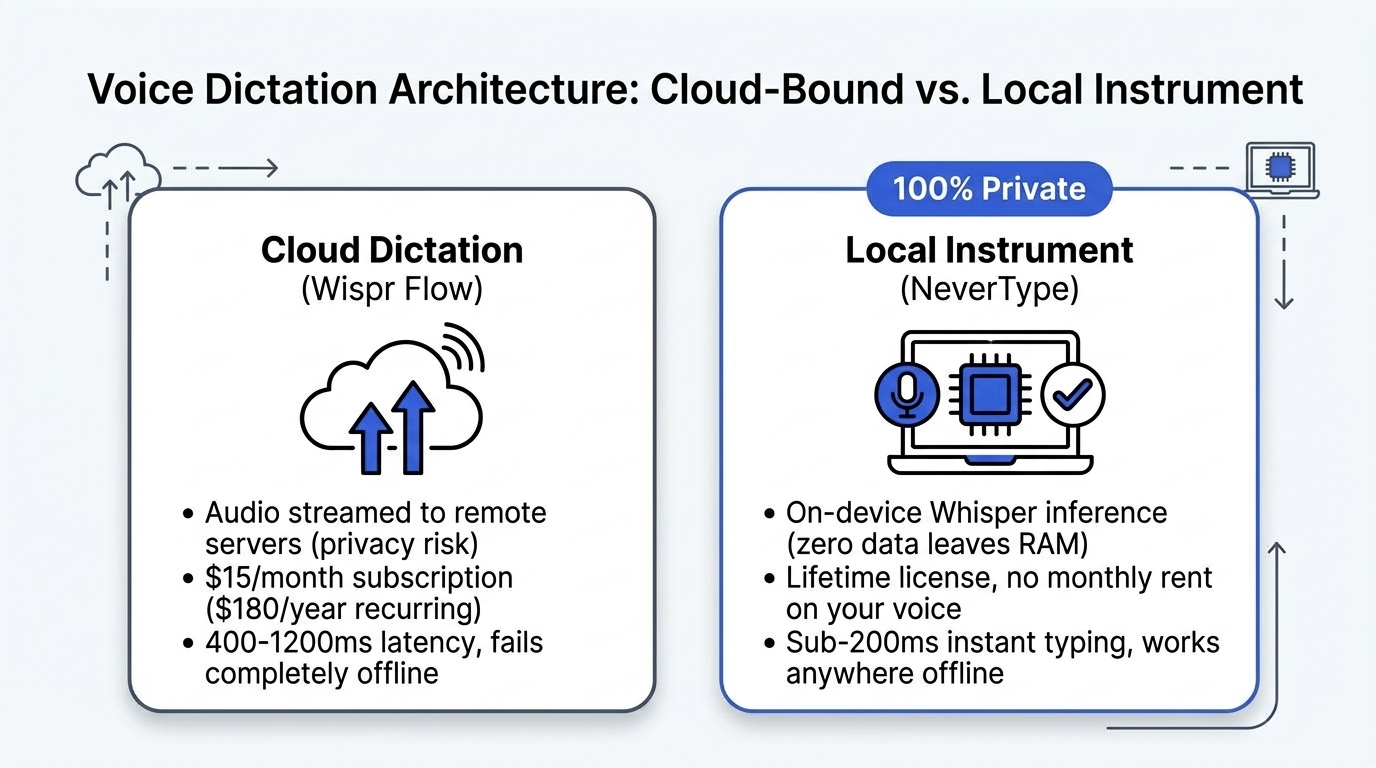
The software works well, but the business model is predatory. Wispr Flow charges $12 to $15 every month. You pay between $144 and $180 every year for software that records your microphone, streams your voice across the web, and stops working the afternoon you cancel your credit card.
We built NeverType around a different premise: real-time speech-to-text and grammar correction running on your own computer silicon, with lifetime ownership and zero cloud data leaks.
1. The Two-Step Dictation Trap
Raw speech recognition captures literal acoustic syllables, forcing you to run an editing pass with your keyboard or an external grammar checker.
Spoken thought is non-linear. When you speak out loud, you pause to organize ideas, restart sentences, and use verbal filler to buy time.
Built-in utilities like Apple Dictation, Google Voice Typing, and Windows Speech Recognition transcribe every acoustic noise literally:
Spoken audio:
"Hey Mark, um, so I looked at the staging database and like it seems that the query for the user dashboard is running super slow, maybe we should, uh, index the account ID column?"

Raw system dictation output:
"Hey Mark um so I looked at the staging database and like it seems that the query for the user dashboard is running super slow maybe we should uh index the account ID column"
Sending that raw text to an engineering lead or a client makes you look careless.
Cleaning it up requires manual clerical labor:
- Highlighting filler words with your cursor.
- Backspacing repeated phrases.
- Adding commas and quotation marks.
- Checking capitalization on technical identifiers.
That editing step ruins your productivity. By the time you finish correcting the syntax, any time you saved by speaking disappears.
2. Real-Time Speech Recognition with Automatic Grammar Polish
NeverType runs speech recognition and destination-aware grammar correction in one local pass, turning spoken thoughts into publication-ready prose before text reaches your application window.
NeverType Local Pipeline (Under 200ms):
[Microphone Audio] -> [Local Whisper Engine] -> [Instinct Grammar Polish] -> [Clean Prose at Cursor]
Instead of pasting raw words directly into your text box, NeverType coordinates two separate local steps inside your machine's system memory:
First, an optimized Whisper model transcribes your microphone buffer into text tokens. On Apple Silicon and modern PC hardware, this phonetic pass finishes in roughly 140 milliseconds.
Second, NeverType's Instinct engine inspects the transcription buffer before pasting. It strips verbal hesitations, removes filler words ("um", "ah", "you know"), repairs incomplete clauses, and inserts punctuation based on the cadence of your speech.
The text that appears in your active app looks like this:
"Hey Mark, I looked at the staging database and noticed the user dashboard query is running slow. We should add an index on the account ID column."
You tap your shortcut, speak naturally, and release the key. Clean prose drops into your cursor location immediately. You never need to touch a grammar extension or backspace a filler word.
3. The Economics of Cloud Dictation Subscriptions
Cloud dictation apps charge monthly subscriptions because every paragraph you speak costs the vendor money in data center electricity and GPU hosting fees.
Wispr Flow locks users into an ongoing rental contract. At $15 per month (or $144 annually paid upfront), the total cost compounds rapidly:
| Timeframe | Wispr Flow ($15/Month) | NeverType Lifetime License |
|---|---|---|
| Year 1 | $180 | One-time license fee |
| Year 2 | $360 | $0 (No monthly bills) |
| Year 3 | $540 | $0 (No monthly bills) |
| Year 5 | $900 | $0 (No monthly bills) |
| Ownership | Rented (stops working if unpaid) | Permanent instrument |
Cloud speech providers use this pricing structure because of how their infrastructure operates.
When you press the hotkey in Wispr Flow, your computer streams microphone audio across WebSockets to remote GPU clusters on Amazon Web Services or RunPod. The company pays for network bandwidth, GPU inference time, and secondary language model passes.
Every sentence you dictate shows up on their hosting bill. If you dictate 5,000 words a day across your emails and documents, you cost them money. They charge monthly subscriptions to protect their profit margins.
NeverType operates differently. Modern computers with Apple Silicon chips or modern PC graphics cards already have dedicated neural processing hardware. NeverType executes speech transcription and grammar cleanup directly on that silicon.
Because your own hardware processes your voice, NeverType does not pay Amazon Web Services every time you dictate a paragraph. That architecture lets us offer a lifetime license. You buy the software once and keep it on your machines permanently.
4. Latency Benchmarks: Why Local Execution Preserves Flow
On-device voice transcription responds in under 200 milliseconds, matching the natural rhythm of human thought, while cloud systems introduce roundtrip network lag.
In cognitive science, responses under 200 milliseconds register as immediate. When your computer inputs text within that window, your brain treats the interface as a physical instrument.
When latency climbs past 500 milliseconds, you enter a hesitation loop. You finish speaking, freeze, watch the screen, wait for the remote server to send back the text, check for mistakes, and only then start forming your next sentence.
| Performance Metric | Wispr Flow (Cloud-First) | NeverType (Local-First) |
|---|---|---|
| Voice-to-Cursor Latency | 500ms to 1,400ms | 140ms to 210ms |
| Grammar Correction Location | Remote cloud API | On-device memory pass |
| Offline Functionality | Fails completely | 100% operational |
| Unstable Wi-Fi Handling | Drops audio packets | Unaffected by network |
| Voice Storage Destination | Multi-tenant cloud servers | Discarded from local RAM |
On hotel networks or crowded office Wi-Fi, cloud dictation often delays text entry by a full second or more. With NeverType, the finished prose appears on your screen the moment your finger leaves the hotkey.
5. Architectural Comparison
Here is how current speech-to-text and grammar correction setups compare across privacy, latency, and cost:
| Feature | NeverType | Wispr Flow | Superwhisper | Grammarly + Apple Dictation |
|---|---|---|---|---|
| Simultaneous Grammar Polish | Built-in local Instinct | Built-in cloud model | Basic formatting | Separate manual step |
| Inference Location | 100% Local Silicon | Remote Cloud Servers | Local and Cloud | Cloud and Local |
| Microphone Privacy | Audio never leaves RAM | Audio sent to cloud | Depends on model | Audio sent to cloud providers |
| Offline Operation | Works without internet | Requires active Wi-Fi | Local models work offline | Fails without internet |
| Average Latency | Sub-200ms | 500ms to 1,400ms | 300ms to 650ms | 600ms plus manual clicks |
| Supported Platforms | macOS, Windows, Linux | macOS, Windows beta | macOS only | macOS, Windows |
| Pricing Model | Lifetime license | $12 to $15 / month | $8/mo or $199 license | $12/month subscription |
| Technical Vocabulary | Programming syntax support | Moderate | Basic | Poor |
6. Daily Workflows Where Voice and Grammar Polish Excels
Combining fast speech recognition with automatic grammar cleanup changes how you handle daily computer communication.
High-Volume Email Drafting
Drafting replies in Gmail or Outlook usually takes minutes of typing at 45 words per minute. With NeverType active, hold your shortcut and speak through your points:
"Sarah, thanks for sending the revised budget drafts. I reviewed the marketing numbers and we need to reduce paid acquisition spending by fifteen percent to meet our cash targets for the quarter. Let's meet Thursday at ten to finalize the spreadsheet."
NeverType cleans your verbal pauses, fixes sentence structure, and drops finished executive prose directly into your draft.
Pull Request Summaries in VS Code
Writing pull request descriptions and code reviews with a keyboard is tedious after hours of debugging. Hold your hotkey inside VS Code, Cursor, or GitHub:
"refactor colon replace recursive directory walker with flat iterative buffer to prevent stack overflow on deep monorepos"
The engine understands programming context, formats the commit header properly, and avoids misinterpreting command line flags.
Braindumping in Notion and Obsidian
Outlining essays, memos, or architecture plans on a keyboard creates cognitive friction. With voice-to-text and grammar cleanup running together, you can pace your room and talk through ideas for twenty minutes. NeverType turns your spoken train of thought into organized paragraphs ready for review.
Frequently Asked Questions
Does NeverType alter my writing voice when it fixes grammar?
No. NeverType preserves your personal vocabulary, style, and phrasing. The Instinct engine focuses on removing disfluencies like "um" and "uh", cleaning run-on sentences, and inserting punctuation. It avoids replacing your natural phrasing with generic corporate buzzwords.
Can I disable grammar correction if I want exact transcription?
Yes. Inside the NeverType settings drawer, you can turn off the Instinct grammar engine whenever you want. When disabled, NeverType outputs an exact transcription of every spoken word.
How does NeverType run locally without draining my battery?
NeverType uses quantized neural model weights optimized for consumer hardware. On macOS, it runs through Apple Silicon Metal shaders. On Windows and Linux, it uses DirectML and ONNX runtimes. The hardware footprint is small, using less battery power than a standard video call.
What happens when I lose internet access?
NeverType functions without interruption. Both the speech recognition model and the Instinct grammar engine run locally on your laptop silicon. You can dictate on flights, in coffee shops with broken Wi-Fi, or in secure office environments with zero network connectivity.
How does the Lifetime Deal work?
NeverType provides a lifetime license option instead of a monthly subscription. You pay once, receive your license key, and use the application permanently. Your offline models and updates remain yours to keep.
The Practical Choice for Daily Writing
Paying a company $15 every month to convert your voice into text is an outdated subscription model.
You already own a computer with fast neural silicon. NeverType turns that hardware into a private instrument that transcribes speech at 200 words per minute, polishes grammar in real time, and belongs to you permanently.
👉 Download NeverType Free for macOS, Windows, and Linux and start dictating with automatic grammar polish today.